fexp-file-explorer
Workspace File Explorer (fexp)



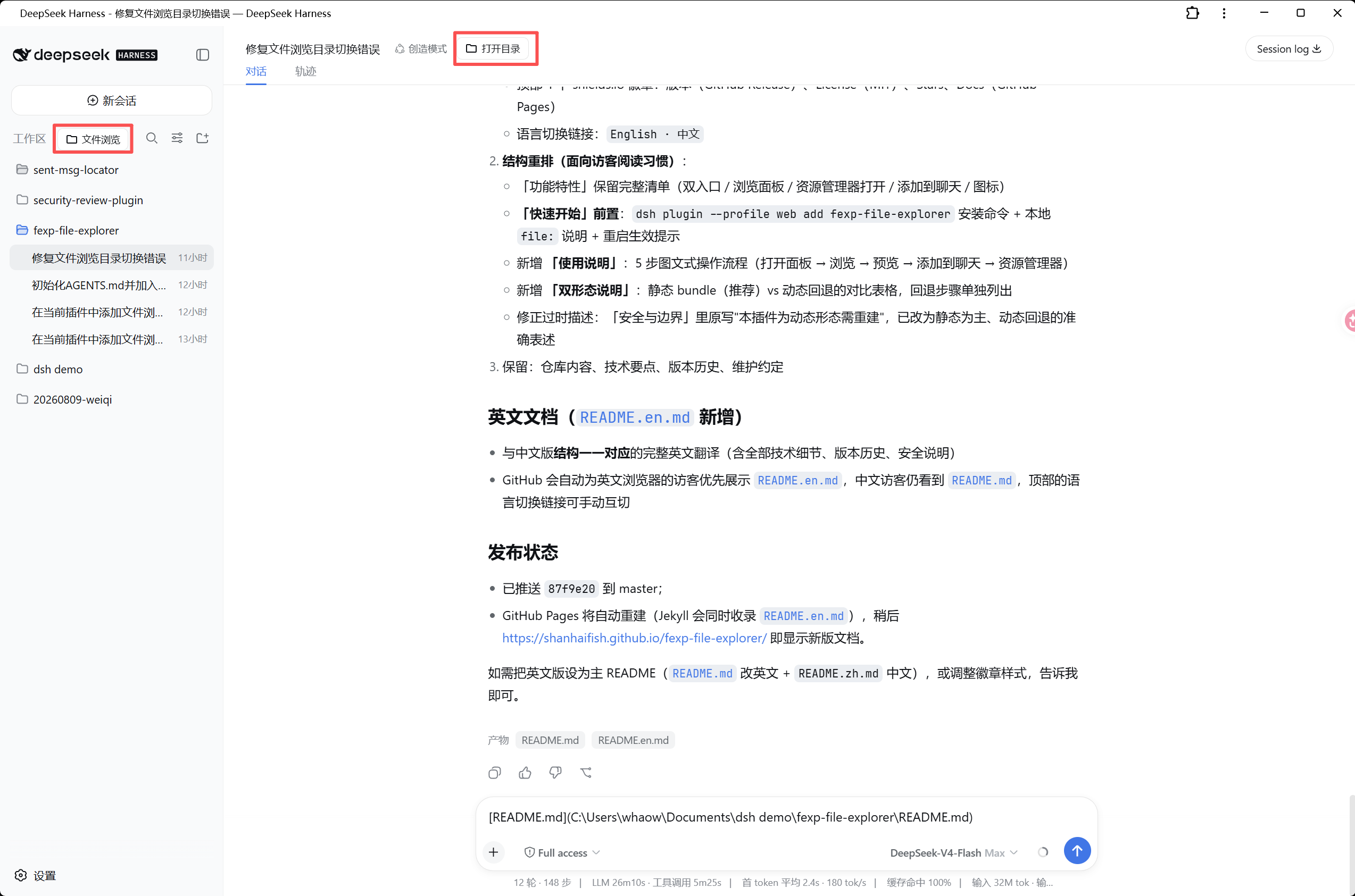
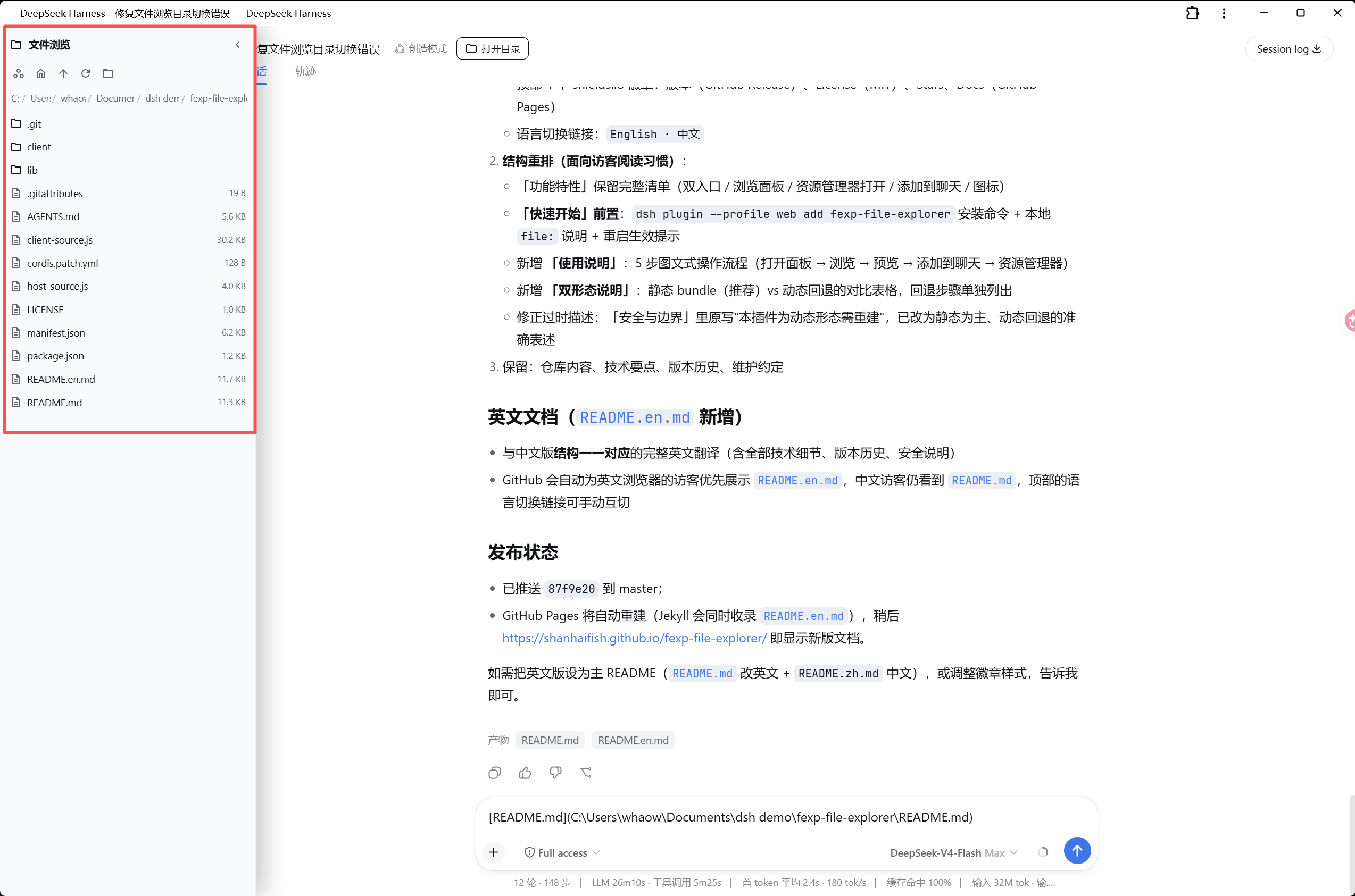
A dynamic Cordis plugin for DSH (DeepSeek Harness) that browses workspace directories and files from the left sidebar. Two entry points — the “File Explorer” pill at the top of the sidebar and the “Open Directory” button in the session header — slide out a 320px panel that locates the current workspace directory. Click a directory to enter it, click a file to preview its text content. The toolbar can open the current directory in the system file explorer with one click, and file references can be appended to the chat input while previewing.
Since v1.5.0 this is a static bundle plugin loaded automatically from the profile layer stack — install once, and it activates on every DSH startup with no manual define/run needed.
Features
- Dual entry points (SVG vector icons; colors use theme CSS variables, so text stays readable on light, dark, and any custom theme):
- “File Explorer” pill button at the top of the sidebar, right of the “Workspaces” title (shown when the sidebar is wide; auto-hidden while the “Search sessions” box is expanded so it never covers the search input, v1.5.1)
- “Open Directory” button in the session header bar
- Browse panel (slides out from either entry, 320px, overlays the left area):
- Automatically locates the current workspace directory (current session
cwd); re-locates automatically when you switch workspaces, while re-opening in the same workspace keeps your last position - Directories first, then files (with sizes); click a directory to enter, click a file to preview
- Breadcrumb navigation at any level; toolbar: current workspace / root / up one level / refresh / open in system file explorer
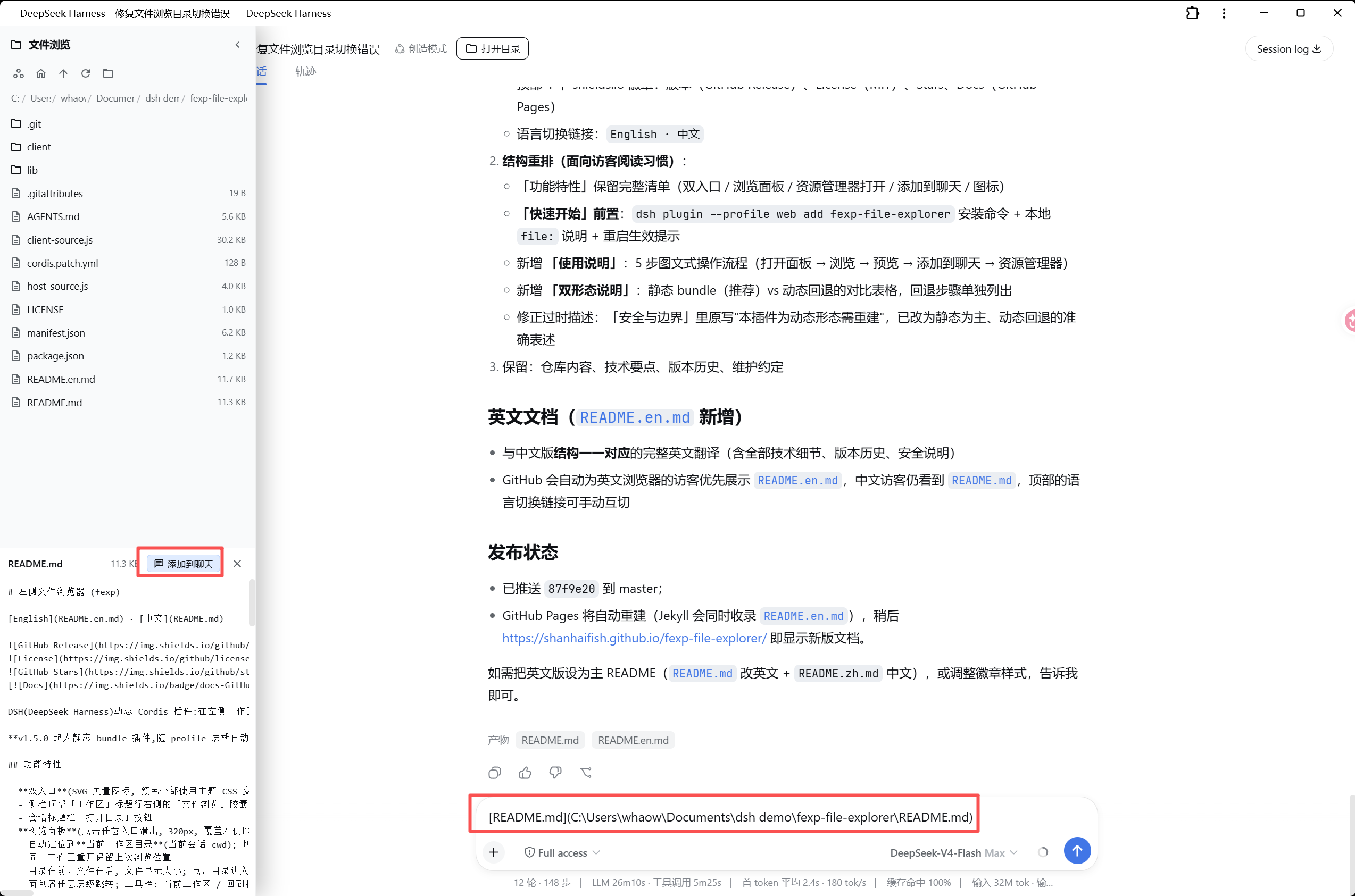
- File preview: text content (256KB default limit, 1MB max), with clear messages for binary or oversized files
- Preview header: file name / size / [Add to chat] / close preview
- Automatically locates the current workspace directory (current session
- Open in system file explorer: one click opens the current directory in the OS file manager (DSH native open-path RPC,
Invoke-Itemon Windows; v1.6.1 adapts to the newersession/openWorkspacePathTypert Remote endpoint, falling back to the legacyhost.openPath/workspaces.openPathwhen unreachable) - Add to chat (v1.6.0): appends a DSH @ file-command reference to the input draft (without overwriting existing content; multiple files add space-separated): files under the session cwd use the relative form (
@client/client.js), files outside keep the absolute path, and paths with spaces follow the official quoted grammar (@"path with spaces"); the input box shows only a short reference, and DSH’s nativeFILE_REFERENCE_PROMPTmakes the model treat @-prefixed paths as explicitly referenced files to read via thereadtool - Icons (v1.4.0): Google Material Icons official library (fonts.google.com/icons, Apache 2.0), solid fill style stays crisp at small sizes, consistent with Chrome/Android first-party visuals
Screenshots
 |
 |
 |
Quick Start
# Install (static bundle, recommended; published to npm)
dsh plugin --profile web add fexp-file-explorer
For local development or unpublished copies use file: pointing at this repository (the path must NOT contain spaces):
dsh plugin --profile web add file:/path/to/fexp-file-explorer
Restart dsh web and the plugin activates automatically: the “File Explorer” pill appears at the top of the sidebar and the “Open Directory” button appears in the session header. No manual define/run required.
Usage
- Open the panel: click “File Explorer” in the sidebar or “Open Directory” in the session header; the 320px panel slides out from the left, locating the current workspace directory;
- Browse: click a directory to enter it; use the toolbar “up one level / root / refresh” or jump to any level via the breadcrumbs;
- Preview files: click a file to preview its text content at the bottom of the panel (256KB default limit);
- Add to chat: while previewing, click “Add to chat” to append a DSH @ file reference (
@relative-path/@"path with spaces") to the input draft, then edit and send; - Open in system file explorer: the rightmost toolbar button opens the current directory in the OS file manager (
Invoke-Itemon Windows).
Repository Contents
| Path | Description |
|---|---|
package.json + cordis.patch.yml + lib/ + client/ |
Static bundle (recommended): auto-loaded on DSH startup after dsh plugin add |
host-source.js + client-source.js |
Dynamic-plugin fallback form: for profiles without bundle support |
manifest.json |
Plugin metadata + restore parameters (plugin/name/purpose/version) |
LICENSE |
MIT License |
assets/ |
UI screenshots (screenshot-1~3.png) |
AGENTS.md |
Agent collaboration conventions (rebuild flow / change workflow / coding conventions / versioning) |
README.md / README.en.md |
中文 / English docs |
Two Forms
| Static bundle (v1.5.0, recommended) | Dynamic plugin (fallback) | |
|---|---|---|
| Loading | dsh plugin add installs into the profile layer stack; auto-loaded on DSH startup |
Must be re-registered with cordis_define + cordis_run after every DSH restart |
| Code | lib/index.js (Host) + client/client.js (Client) |
host-source.js + client-source.js |
| When to use | Normal profiles (web, etc.) | Profiles without bundle support |
Dynamic fallback steps:
- Have an agent read
host-source.jsandclient-source.js; cordis_define:plugin: { kind: "new", idPrefix: "fexp" },name/purposefrommanifest.json(purpose includes theCAPABILITIES: fs, rpcdeclaration),code.host/code.clientas the full contents of the two source files;cordis_runto activate; success when the panel appears.
The dynamic form does not survive DSH restarts and must be reloaded; the static bundle form has no such limitation.
Technical Notes
- Host half: the static bundle form lives in
lib/index.jsand mounts three JSON routes viawebServer(/fexp/default-root,/fexp/list-dir,/fexp/read-file) on top of the DSHfsservice (resolve/listDir/stat/readText) andsandboxPolicy.workspaceRoot; the dynamic fallback inhost-source.jsexposes the same three methods as Package-private RPCs viaharness.handle. - Client half: uses only additive slots (
shell.overlay,conversation.session.header.actions,conversation.input.dock,sidebar.footer.action) and never replaces built-in UI; plain JS +React.createElement, no JSX/TS. The static form registers viawindow.__ModuleLoader__.load, replaceshost.callwith fetches to same-origin routes, and replacesstyles.insertwith a self-managed<style>tag. - Startup race fix (v1.0.0):
useStoreself-heals by re-reading state right after subscribing, so a probe update landing before the subscription is never lost;sidebarWidedefaults totrueso the top button stays visible even if the probe fails. - Open in explorer (v1.1.0/1.5.2): the path goes to DSH native
host.openPath(Invoke-Itemon Windows). Since v1.5.2 it calls the native API directly (POST /api/host.openPath, the official client-request envelope protocol, same-origin) — intercepting plugins likedsh-better-sidebarmonkey-patchworkspaces.openPathand reroute “open directory” into “open file in the sidebar editor”, which rejects directories with"…" is a directory; direct calls bypass the patched channel, falling back toworkspaces.openPathwhen fetch is unavailable or the network layer fails; no new Host RPC, no spawn/external network capability. - Add to chat (v1.2.0~v1.6.0): a hidden bridge inside the session-scoped
conversation.input.dockslot captures the standardinputActions(setDraft) anduseInput(draft subscription); “Add to chat” callssetDraft(existing draft + reference)— the same official channel the built-in UI uses to write the input box. Pure client capability, no new Host RPC. Since v1.6.0 the inserted reference uses the DSH @ file-command grammar (mirroring the official file-referenceformatFileMention): relative path inside the cwd, absolute path outside, quoted@"…"when the path contains spaces; DSH’s system-promptFILE_REFERENCE_PROMPTmakes the model treat @-prefixed paths as explicitly referenced files to read via thereadtool, so no long Markdown link is needed. - Workspace binding (v1.2.2): the panel-loading effect was guarded by
path === null, so after browsing once (or entering a subdirectory), closing and reopening — or switching workspaces — never reloaded, leaving the previous workspace’s directory on screen. AboundWsbinding state now re-binds and reloads the current workspace directory wheneverboundWs !== current wsPathon open or workspace switch; re-opening in the same workspace keeps the last position. Both entries go throughopenPanelFor; the toolbar “current workspace” goes throughbindWorkspace. - Theme contrast (v1.2.3): entry buttons used hard-coded inline colors (near-white
#e8edf3text) that vanished on light themes; they now use CSS classes.fexp-entry-btn/.fexp-entry-btn-activewith theme CSS variables (label-primarytext,bg-layer-1/2background,border-l2border,brand-primaryactive state), adapting automatically to any theme with hover feedback. - Icon library (v1.4.0): Google Material Icons official paths, solid fill rendering (
fill="currentColor", no stroke), default size 16px; the Lucide line icons from v1.3.0 are superseded. - Search-box avoidance (v1.5.1): the “File Explorer” pill is fixed-positioned on the “Workspaces” title row, so it landed exactly on top of the expanded “Search sessions” box.
TopTogglenow watches the search button’saria-expandedattribute with aMutationObserver(the expanded search button carriesaria-expanded="true"and its next sibling is aninput[type=text], which distinguishes it from the session rows / group-collapse buttons that also usearia-expanded); the entry button hides while the search box is expanded and reappears when it collapses. Host unchanged.
Security & Boundaries
- Capability declaration:
CAPABILITIES: fs, rpc— filesystem access (the hostfsservice) and regular RPC only; no network requests, no spawn/process, no credential access. - Security review: WARN level (38/300 since v1.5.2; 33/300 before); reviewed by
plugin_security_review/plugin_security_audit(see dsh-plugin-security-review). - Known limitations: file preview defaults to a 256KB limit (1MB max); oversized files return a clear
FS_TOO_LARGEerror and should be read by the assistant in conversation. The static bundle loads with the profile; the dynamic fallback form does not survive DSH restarts and must be rebuilt.
Version History
| Version | Notes |
|---|---|
| v1.6.1 | Fixed “Open in system Explorer” breaking after a DSH upgrade: newer DSH (0.1.3+) refactored the host open-path RPC away from host.openPath into the Typert Remote endpoint session/openWorkspacePath (the official client calls ctx.remote.session.openWorkspacePath({ path }), actually POST /api/session/openWorkspacePath with the payload wrapped as { args: { request } }); the old endpoint no longer exists (404), and the fallback workspaces.openPath was also removed from the newer client, so the button stopped opening the folder. nativeOpenPath now tries the new endpoint first and throws on an explicit business error; it only falls back to the old endpoint and to workspaces.openPath (when still present) when the new one is unreachable (404/network/non-JSON). Host unchanged; security review WARN (38/300) |
| v1.6.0 | “Add to chat” now inserts a DSH @ file-command reference instead of the long [file name](absolute path) text: official grammar @relative-path (inside cwd) / @absolute-path (outside) / @"path with spaces" (when containing spaces); DSH’s native FILE_REFERENCE_PROMPT makes the model treat @-prefixed paths as explicitly referenced files to read via the read tool; multiple additions separate by spaces; the input box shows only a short reference; pure client capability, security review stays WARN (38/300) |
| v1.5.3 | Trimmed the “Open in system Explorer” button tooltip: the 14-char 在系统资源管理器中打开当前目录 becomes the 6-char 打开资源管理器, matching the 4–6 char style of the other toolbar buttons; wording-only change, no logic change; security review stays WARN (38/300) |
| v1.5.2 | Fixed “Open in system Explorer” being hijacked by intercepting plugins: with dsh-better-sidebar installed (it monkey-patches workspaces.openPath by default, interceptOpenPath: true), the call was rerouted to “open the file in the sidebar editor”, which rejects directories with "<path>" is a directory. openInExplorer now calls the native DSH host.openPath directly (the same client-request envelope protocol as the official client, same-origin POST /api/host.openPath, no new Host RPC / no external network), bypassing the patched channel; falls back to workspaces.openPath when fetch is unavailable or the network layer fails, and reports business errors inside the envelope as-is; the toolbar button no longer depends on workspaces being present. Host unchanged; security review WARN (38/300) |
| v1.5.1 | Fixed the “File Explorer” button covering the “Search sessions” box: expanding the search box from the workspace title row placed the fixed-positioned entry button right on top of the input. TopToggle now uses a MutationObserver on the search button’s aria-expanded state (expanded search button = aria-expanded="true" + next sibling input[type=text], distinguishable from session-row/group-collapse buttons), hiding the entry button while the search box is expanded and restoring it on collapse; Host unchanged, pure client capability, security review stays WARN (33/300) |
| v1.5.0 | Static-bundled: package.json (dsh.bundle.patch + dsh.client.platform) + cordis.patch.yml + lib/index.js (three JSON routes on webServer) + client/client.js (__ModuleLoader__ registration, host.call→fetch, styles→self-managed tags); auto-loads from the profile layer stack, no manual define/run after restarts; dynamic sources kept as fallback; security review stays WARN (33/300) |
| v1.4.0 | Icons switched to Google Material Icons (Apache 2.0): solid fill stays crisp at small sizes, Chrome/Android-grade; close panel=keyboard_double_arrow_left («, like VS Code), workspace=workspaces, root=home, up=arrow_upward, refresh=refresh, open-in-explorer=folder_open, close preview=close; svgIcon uses fill=currentColor, default size 14→16px; Host unchanged |
| v1.3.0 | Icons switched to Lucide (ISC): panel-left-close, briefcase, house, folder-up, refresh-cw, folder-open, x (superseded by Material Icons in v1.4.0); Host unchanged |
| v1.2.3 | Fixed entry-button text invisible on light themes: switched to CSS classes with theme CSS variables (label-primary text / bg-layer-1/2 background / brand-primary active), adaptive to any theme with hover feedback; Host unchanged |
| v1.2.2 | Fixed “File Explorer” opening the previous workspace’s directory: the path===null guard in the panel effect never reloaded after switching workspaces; added boundWs workspace binding with auto re-location; both entries go through openPanelFor; Host unchanged |
| v1.2.1 | Removed the “added” state: the “Add to chat” button stays always enabled for adding multiple files |
| v1.2.0 | Added “Add to chat” in the preview header: hidden bridge in conversation.input.dock captures inputActions/useInput, appends the file reference to the input draft; pure client capability |
| v1.1.0 | Added “open in system file explorer” toolbar button via DSH native host.openPath (Invoke-Item on Windows); no new Host RPC/capability |
| v1.0.0 | Final shape: top “File Explorer” + header “Open Directory” dual entries; dark-theme inline styles; startup race fix (self-healing subscription + wide-sidebar default) |
| (pkg-1~pkg-7) | Evolution: sidebar bottom button → top overlay → pill tab → inline-style visibility fixes → removed bottom button and diagnostics bar |
Maintenance
- Commit convention: Conventional Commits with Chinese descriptions (
feat:feature /fix:bug fix /docs:docs /refactor:refactor /chore:chores); source / manifest / README stay in sync. - Agent collaboration: read
AGENTS.mdbefore making changes; rebuild and change workflows are documented there. - Releases: tag (
vX.Y.Z) andgh release createafter each feature iteration; the docs site builds automatically on GitHub Pages (https://shanhaifish.github.io/fexp-file-explorer/).